Gameplay Spotlight
A gameplay-first GameCube launcher for choosing something to play from the couch. You browse real gameplay stills and game logos instead of cover art.
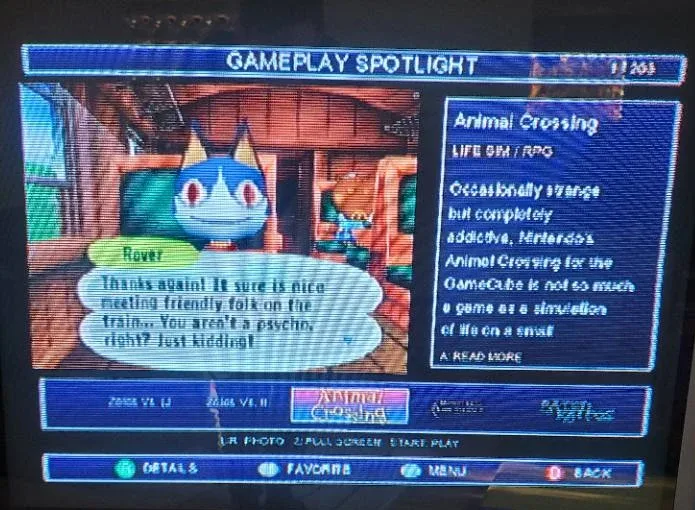
Designed for the couch and a CRT
Cover art tells you what a game is called. A gameplay still tells you what it feels like to play, which is what you're actually deciding from across the room. So Gameplay Spotlight leads with uncropped 4:3 gameplay images and a wrapping carousel of game logos, laid out for a CRT with adjustable screen position and scale.
- A showcase view with a bigger image, the logo, player and patch badges and a Play prompt.
- Favorites, recent launches, game-night filters and a bookmark that remembers where you were.
- Fullscreen stills and photo cycling, with About and Patches tabs.
- Destructive actions kept apart from browsing: deleted images go to a recoverable trash with their own confirmation.
It's a fork built on Cubiboot, and Swiss still launches the games. Photo above: the real hardware, a GameCube with GC Loader driving a 4:3 CRT. It's a source-only developer preview.
The design problem
Picking a game from the couch is a different job from managing a game library. Stock GameCube loaders are built for the second job: file lists and box art, read up close. I wanted a launcher that answers one question from across the room, "what do I feel like playing?", with as few button presses as possible.
Key decisions
- Gameplay first, cover art never. Every game leads with an uncropped 4:3 still, so you judge it by how it plays, not by its box.
- Two speeds of browsing. Left and right step through games; up and down jump five at a time. A opens a showcase with more detail, and Start plays from anywhere.
- One button, one meaning. Y always favorites, B always goes back, L and R always change the photo, on every screen.
- Built for the TV it runs on. Old CRTs crop and shift the picture, so screen position and scale are adjustable, and navigation is silent for late-night play.
- Safe by default. Deleting an image sends it to a recoverable trash with its own confirmation, away from normal browsing. Your place in the library saves after two seconds idle, so it's never lost and the SD card isn't hammered with writes.
| Library | Left/right browse · Up/down jump five · A showcase · Start play · Y favorite |
|---|---|
| Showcase | A or Start play · Left/right change tab · L/R photo · Z fullscreen · B back |
| Fullscreen | L/R photo · B back |
What I learned
Testing on the real console and a real CRT changed the design more than anything I planned on a monitor. Text sizes, safe margins and how fast the carousel feels only made sense on the actual TV, which is the same reason I push for playable builds at work.